On this page
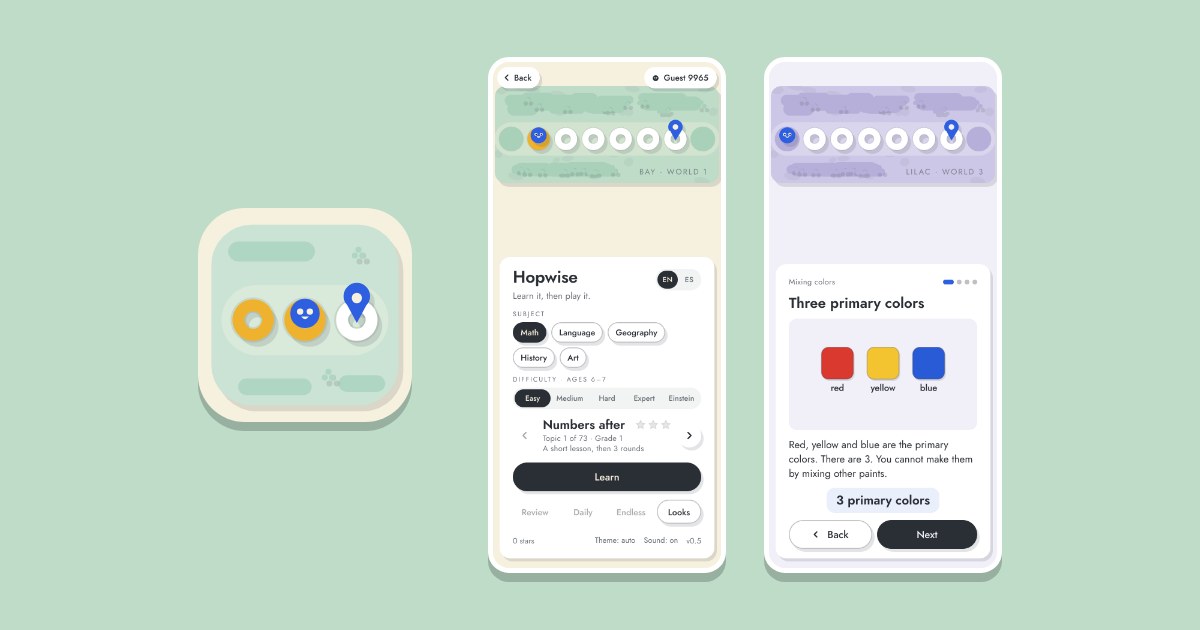
If you are picking a game for a child, the first question is what it teaches. Hopwise is a learning game for kids from 6 to 12 that covers math, language, geography, history and art, grade by grade, from 1st to 7th. Each topic starts with a short lesson, and the questions come only after it. This note is for the parents and teachers who choose what a child plays, and it describes version 0.5. You can play Hopwise in another tab while you read.
What does Hopwise teach? #
Hopwise has five subjects. Each one is a path of topics in the order a school teaches them, so in math counting on comes before adding, and adding comes before times tables.
- Math: 73 topics, from the numbers after and before in 1st grade to powers, circles and the median in 7th.
- Language: in English (38 topics) or in Spanish (39 topics), each with topics of its own: letters and sounds, sentences, spelling, word classes, verb tenses, punctuation and more.
- Geography: 40 topics, from the countryside and the city in 1st grade, through the provinces of Argentina in 4th and the countries of America in 5th, to the continents and countries of the world in 7th.
- History: 32 topics of world history and of the history of Argentina, from life long ago and ancient peoples to Greece and Rome, the Middle Ages and the 20th century.
- Art: 20 topics of visual arts, from mixing colors, lines and textures in 1st and 2nd grade, through the color wheel and depth, to Argentine artists in 6th grade and the great artists and styles of the world in 7th.
The topics follow school curricula. For math, Language in Spanish, geography and history they come from Argentina's national guidelines (NAP) and the Buenos Aires City curriculum. For art they come from the NAP, with the Buenos Aires City curriculum for 1st to 3rd grade and the Buenos Aires Province curriculum as a check. For Language in English they come from the US Common Core.
Which grades does it cover, and how does a child pick one? #
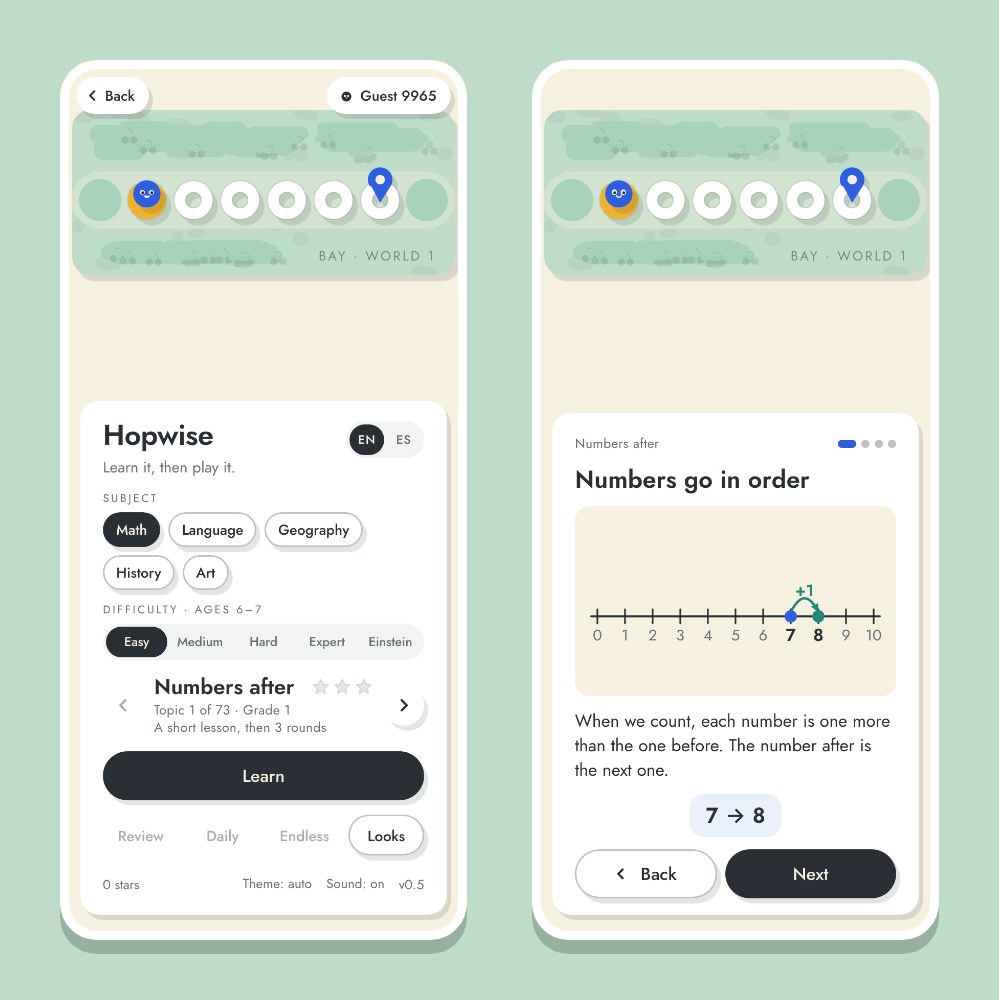
Before playing, a child picks an age. The age sets where each path starts and where it ends.
| Difficulty | Age | Grades |
|---|---|---|
| Easy | 6 and 7 | 1st and 2nd |
| Medium | 8 and 9 | 3rd and 4th |
| Hard | 10 and 11 | 5th and 6th |
| Expert | 12 | 7th |
| Einstein | The hardest | Of every grade |
Topics from earlier grades stay open for review, and topics from later grades open when an older age is picked. A few examples from each stage:
- 1st and 2nd grade: numbers after and before, adding and making 10, shapes, the days of the week; in Language, letters and sounds and, in English, plurals; in History, then and now and castles and villages; in Art, the primary colors and mixing them.
- 3rd and 4th grade: the times tables, dividing, the clock, halves, rounding and fractions; in Geography, towns and cities, maps and plans; in Art, the color wheel and kinds of pictures.
- 5th and 6th grade: multiples and divisors, area and perimeter, percent, averages; in History, the May Revolution and independence, the great immigration; in Art, warm and cool colors, light and shadow.
- 7th grade: powers, square roots, circles, volume, the median and mode; in Geography, the continents and the capitals of Europe, Asia and Africa; in History, prehistory, Greece and Rome.
The questions climb with the child: a round with every answer right brings some harder questions on the same topics, and a second one more. It never opens another grade.
How does a topic work? #
Every topic goes in the same order.
- Lesson: a few cards, each with a picture and a worked example. The child moves through them with Next and Back.
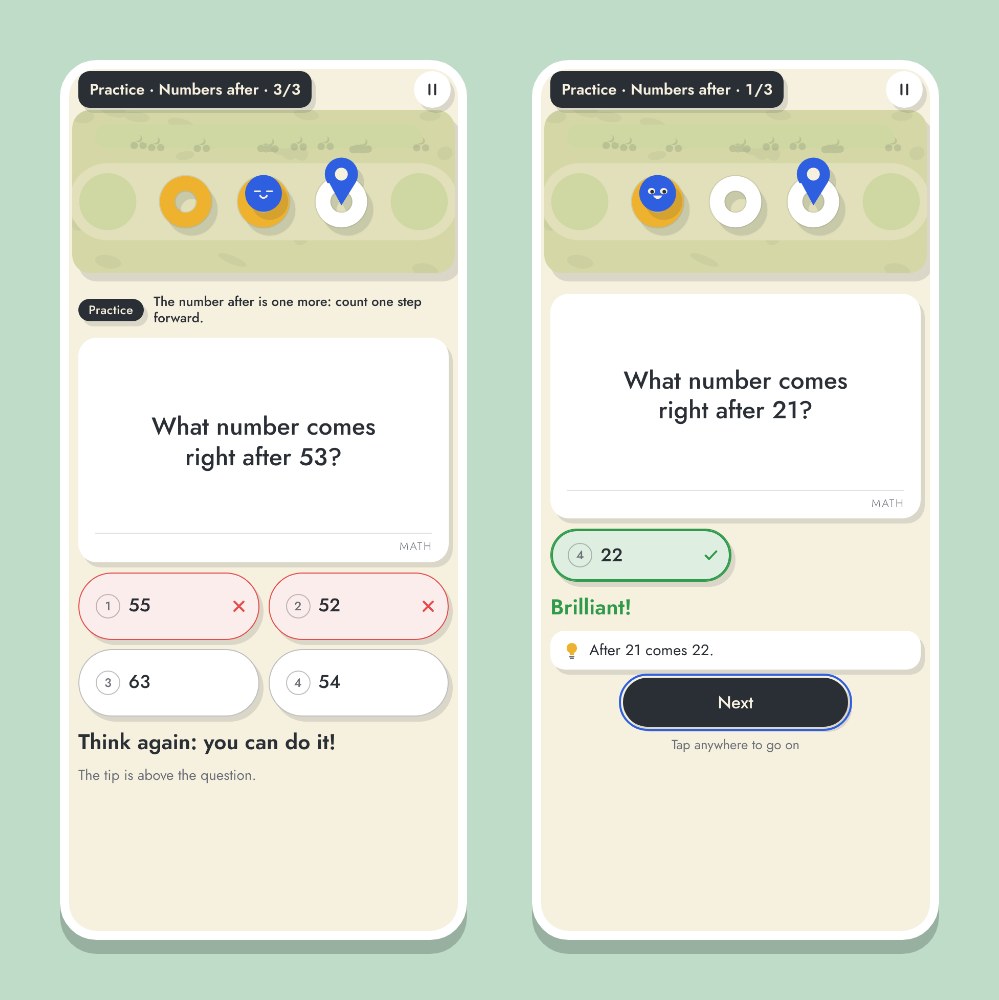
- Practice: three questions where a wrong answer is crossed out and the child tries again, with the lesson's tip on screen.
- Three rounds: the questions of the topic, in rounds of 6, 6 and 8. The first two need 4 right answers to pass and the third needs 5.
Passing the three rounds means the topic is learned, and the next one opens. A round that is not passed offers the lesson again, or the same round with new questions.
What does a child do on screen? #
On the menu the child picks a subject and an age, then taps Learn. The button then changes to Practice, and after that to Round 1 through Round 3, as the topic moves on.
In a round, a little buddy waits on a row of stepping stones across a pond, and every answer is a hop to the next stone. Questions come in several shapes: pick one of four answers, true or false, type a number (in math), find the one that doesn't belong, match pairs and put things in order. The first time a new shape shows up, a short hint says what to do.
| Phone or tablet | Computer | |
|---|---|---|
| Lessons | Tap Next and Back | Arrow keys, or Space or Enter for the next card |
| Answer | Tap an answer. For a number, type it on the game's own keypad and tap OK | The keys 1 to 4 pick an answer; digits and Enter type a number |
| Go on | Tap Next, or anywhere after the answer is shown | Space or Enter |
It plays with the phone upright or on its side.
What happens when an answer is wrong? #
A wrong answer never stops a round and never says the child lost. In practice it says something like "Almost! Have another go." and the wrong answer is crossed out. In a round it gives a kind word, shows the right answer and adds a short fact. A right answer gets a cheer and a fact too.
Every round can earn three stars: one for passing it, one for getting every answer right, and one for passing on the first try. Stars, rounds, daily rounds and Endless also open new looks for the buddy, its hops and the scenery, 300 in all, every one earned by playing.
What can a child do once a topic is learned? #
Three modes use what has been learned so far:
- Review: a round of questions from every topic learned, in all subjects.
- Daily: ten questions a day from what has been learned.
- Endless: questions that keep getting harder until three wrong answers.
Is it free, and does it work offline? #
Hopwise is free. It shows no ads and sells nothing: there is no store and there are no coins. Progress and settings are saved in the browser, on the device only; clearing the browser's data for the site erases them. Our privacy policy has the details.
While it plays, the game makes no network requests, and you can download it for offline play. On Hopwise's page tap Download for offline play, or use Download all games for kids on the games for kids page. A game you have already played on the device also opens offline in most browsers. For an icon on the home screen, see how to add our browser games to your phone's home screen.
Hopwise plays in English and in Spanish. It starts in the site's language, and the EN and ES switch at the top of its menu changes it for the whole site.
For a first try
Start with the topic the child is learning at school: pick that grade's age, read the lesson together and let the child do the practice alone.
Play Hopwise in the browser, on a phone, a tablet or a computer.